Website Redesign in Murray, Kentucky
Replace a dated, slow, or unmanageable site without throwing away the rankings you already have. Every redesign we do includes a full URL audit and a mapped 301 for every address that changes.
The Expensive Way to Redesign a Website
It goes like this. A business hires somebody to build a beautiful new site. It launches. Everybody is pleased with how it looks. Six weeks later the phone is quieter, and nobody can say exactly when it got quiet. Three months later somebody finally checks the analytics and organic traffic is down 60 percent from where it was the week before launch.
The design was never the problem. What happened is that the new site put every page at a new address and nothing was left behind at the old ones. Every link anybody had ever built to that business, every bookmark, every directory listing, and every ounce of credit those pages had accumulated with search engines over eight years pointed at a 404 page. Meanwhile the three pages that had been quietly producing most of the leads were rewritten into something shorter and prettier that no longer matched what people search for.
Every bit of that is preventable, and preventing it is not expensive. It is a disciplined checklist executed before, during, and after launch. We run that checklist on every redesign, and the work below describes exactly what is on it, so you can hold whoever you hire to the same standard even if it is not us.
We are in Murray and we have been doing this since 2015. We host hundreds of sites and we have taken over plenty of them from developers who vanished, platforms nobody could log into, and one memorable case where the domain was registered to a company that had gone out of business. It is usually fixable.
Do You Actually Need One?
Eight Signs a Site Is Past Saving
One or two of these is a maintenance problem. Four or more and you are paying to keep something alive that is working against you.
It is hard to use on a phone
Pinch to zoom, tiny tap targets, a menu that will not open. More than half the people finding you are on a phone, and most of them leave rather than fight it.
It takes more than three seconds to load
Usually uncompressed images, a bloated theme, and cheap oversold hosting. Speed is both a ranking factor and the reason people leave before your page finishes drawing.
There is no padlock in the address bar
No SSL certificate means browsers warn visitors that your site is "not secure" before they read a word. Free certificates have existed for a decade. There is no excuse left.
You cannot change anything yourself
If updating your hours requires emailing somebody who may or may not respond, the site is a liability. Your hours, staff, and prices should never be hostage to a stranger.
The contact form stopped working
This one is quiet and expensive. Broken forms are extremely common on aging sites, and nobody finds out until months of inquiries have vanished into nothing.
It does not describe what you actually do now
Businesses change. Services get added and dropped, locations move, staff turn over. A site describing the business you were in 2016 is actively working against you.
It has one page for nine services
Search engines match specific pages to specific searches. A single "Services" page listing everything gives them almost nothing to work with and gives visitors a wall to scan.
The developer disappeared
The most common call we get. Nobody has the logins, nobody knows where it is hosted, and the domain may be registered to somebody who stopped answering email years ago.
The Cheaper Option Is Often Right
Refresh or Redesign?
A refresh keeps your existing site and fixes what is wrong with it. A redesign starts over. Most web companies never mention the first option.
| A refresh is enough when… | You need a redesign when… | |
|---|---|---|
| Structure and navigation | Sound, just needs better layout | Missing whole sections you need, like service and area pages |
| Content accuracy | Mostly still true, needs editing | Describes a business you no longer run |
| Platform | Modern, supported, and you can access it | Abandoned, proprietary, or nobody has the logins |
| Security | SSL present, updates possible | No SSL, no updates in years, or already compromised |
| Forms and functionality | Working, could be improved | Broken, or you need things it cannot do |
| What it costs | A fraction of a rebuild | Comparable to a new build, from $1,499 or $3,499 |
Pricing for both sits alongside everything else on our website cost guide, and the packages themselves are detailed on the main website design page.
The Part That Actually Matters
Keeping Your Rankings Through a Redesign
Seven steps, in order. Hold whoever you hire to this list, even if it is not us.
Inventory every existing URL
Before a single pixel gets designed, we crawl your current site and pull a list of every page that exists, cross-referenced with Search Console and Analytics so we know what each one ranks for and what traffic it gets. You cannot protect what you have not counted. This step is where we usually discover pages nobody remembered publishing that are quietly bringing in a third of your visitors.
Decide keep, merge, or retire
Pages that earn traffic get kept and improved rather than rewritten from scratch. Near-duplicates get merged into one stronger page. Pages that have never received a visitor get retired. Every decision gets written down, because the redirect map is built from this document and a redirect map assembled from memory at launch is how sites lose rankings.
Keep the URL wherever you can
The safest redirect is the one you never need. If a page is staying, it keeps its address. We only change a URL when there is a real reason, such as a nonsense address from an old platform or a structure that has to change to support new sections. Changing every URL because the new system prefers a different pattern is a self-inflicted wound.
Map a 301 for every URL that does change
One old address, one new address, pointed at the closest genuine equivalent. Not the homepage. Dumping every retired URL onto the homepage technically avoids 404 errors while discarding most of the value those pages had accumulated, and it is the single most common shortcut in a careless migration.
Preserve what is working on your best pages
If a page ranks, the words on it are part of why. We do not throw out proven copy because it is old. We keep the substance, keep the headings that are doing work, and improve the layout, speed, and calls to action around it. Redesigns fail when a designer rewrites a top-performing page into something prettier and emptier.
Test the redirects before DNS moves
Every mapped redirect gets checked on the staging server, along with the forms, the SSL certificate, the sitemap, and the robots rules. The most embarrassing launch failure in this business is shipping a new site with indexing still blocked from the staging environment, and it happens constantly.
Watch Search Console for eight weeks
Daily for the first two weeks, then weekly. We are looking for crawl errors, unexpected 404s, indexing drops, and ranking movement against the baseline we recorded before launch. A small dip for one to three weeks is normal while search engines reprocess. A dip that does not recover is a problem to investigate, not to explain away.
Getting Off Wix, Squarespace, GoDaddy, or Old WordPress
The word “migration” implies your site gets picked up and set down somewhere else. For three of these four, that is not what happens, and it is worth understanding before you start, because it changes both the cost and the plan.
Wix
There is no meaningful export. Moving off Wix means rebuilding the site from your content, which is fine, because the content is where the value is. The critical piece is URL mapping, since Wix uses its own address patterns and everything will change.
Squarespace
Exports a partial file covering some pages and blog posts. Layouts, forms, and anything platform-specific do not come with it. Treat it as a content backup rather than a migration, and plan for a rebuild with a full redirect map.
GoDaddy Website Builder
Similar story, with the added wrinkle that the domain, hosting, email, and site are often bundled in one account. We untangle those carefully so nobody loses email during a switchover.
Old WordPress
The easiest migration of the four, because everything is genuinely portable. Content, media, and URLs come across cleanly. The work is usually cleaning up a decade of abandoned plugins and a theme nobody has updated since 2017.
In every case the content is the asset and the content moves. What does not move is the layout, the platform-specific features, and the URL structure, which is exactly why the redirect map matters more in a platform migration than in any other kind of redesign.
One detail we handle carefully every time: email. If your email runs on the same domain, and with GoDaddy in particular it very often does, the mail records have to be carried across precisely before anything moves. Losing a website for an afternoon is annoying. Losing email is a real problem, and it is entirely avoidable with ten minutes of attention.
Not sure whether leaving your builder is even the right call? We wrote an honest assessment of when a DIY platform is genuinely the better choice on our custom website vs. DIY builders page.
Recent Work
Sites We Built and Still Run
Every one of these is still online, still hosted by us, and still getting updated. That last part is the whole point.

Ace Tire
acetiremurray.com
Tire and auto service in Murray. Fast, mobile-first, and built so somebody stuck on the shoulder can find them and call in one motion.

Superior Cleaning of Murray
superiorcleaningofmurray.com
Cleaning company covering Murray and Calloway County, with a structure built to turn specific local searches into booked jobs.

Helm DMS
helmdms.com
Dealer management system with a marketing site and a real application behind it, for an industry audience with no tolerance for clutter.
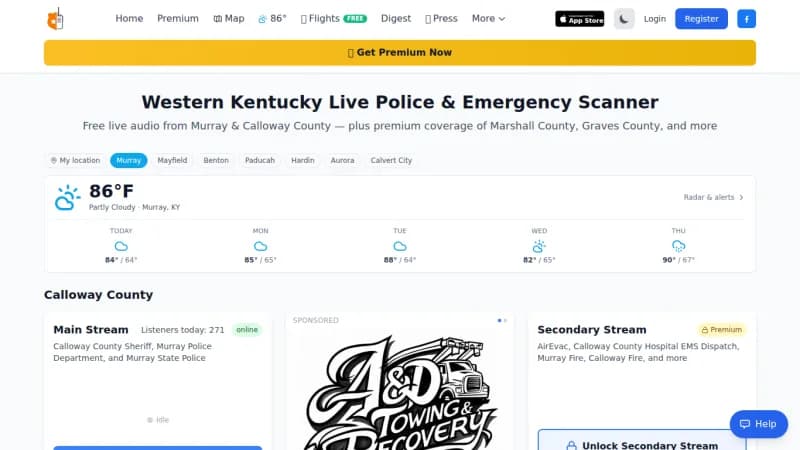
Murray Scanner
murrayscanner.com
Live local scanner and audio streaming, engineered to hold up under sharp traffic spikes when news breaks in Calloway County.
How the Switchover Actually Works
Your current site stays live and untouched the entire time we are building. The new one lives on a staging address that you can open on your own phone whenever you want, which is deliberate: it is far cheaper to change your mind about a layout in week two than in week six.
When you have approved everything, launch happens in a fixed order. The new site goes into place on the server. The SSL certificate is installed and verified. Every mapped redirect is tested. Forms are submitted end to end to confirm they reach both your email and your phone. The sitemap is generated and the robots rules are checked, specifically to make sure nothing from the staging environment is still telling search engines to stay away. Only then does DNS change to point your domain at the new server.
For a few hours after that, DNS propagates. Some visitors see the old site and some see the new one, and both are fully functional, so there is no window where anybody hits a broken page. Then we submit the new sitemap to Search Console and start watching.
After launch your site sits on our managed hosting with SSL, daily backups, caching, malware scanning, and uptime monitoring, and the ongoing content changes are handled on the $49 a month care plan. The server side is detailed under managed web hosting.
FAQ
Website Redesign Questions
It can, badly, and it is the most common way a redesign goes wrong. The damage almost never comes from the new design. It comes from changed URLs with no redirects, from rewriting or deleting pages that were quietly earning all your traffic, and from launching with pages accidentally blocked from indexing. A redesign done carefully usually improves rankings, because the new site is faster, works properly on a phone, and has more and better content. A redesign done carelessly can cut organic traffic by half within a month, and recovering takes far longer than the launch did. The protection is unglamorous: inventory every existing URL, map a 301 redirect for every one that changes, preserve the content on your best-performing pages, and watch Search Console closely for the first eight weeks.
A 301 is a permanent redirect: a rule on your server that says the page that used to live at this address now lives at that one. It matters for two audiences. For visitors, it means the link somebody bookmarked, printed on a business card, or posted on Facebook three years ago still lands somewhere useful instead of on a 404 page. For search engines, it passes along most of the accumulated credit the old page had earned, so the new page inherits the ranking rather than starting from nothing. Every URL that changes in a redesign needs one, mapped to the closest equivalent new page. Dumping every old URL onto the homepage is not a redirect map, it is a way to lose everything you had while technically avoiding 404s.
A refresh is the better buy more often than most designers will admit. If the structure is sound, the content is still accurate, the platform is still supported, and the real problems are that it looks dated, loads slowly, and is awkward on a phone, then new design work, better photography, speed optimization, and a security cleanup can get you most of the way for a fraction of a rebuild. A full redesign earns its money when the site is on a platform nobody supports anymore, when forms are broken or the site is not secure, when you cannot edit anything without calling somebody, when the content genuinely no longer describes your business, or when it is missing entire sections you need such as service pages and area pages. We will look at what you have and tell you which one you are, including when the answer is the cheaper one.
Yes, and it is a rebuild rather than a move, because neither platform lets you export a working site. Squarespace will export a partial file that covers some pages and blog posts and loses your layout, forms, and anything platform-specific. Wix has no meaningful export at all. So what actually happens is that we take your content, meaning the text, the images, and the structure, and rebuild it on a platform you own. The good news is that the content is the part with the value, and moving it is straightforward. The critical detail is the URL structure, because those platforms use their own address patterns. We inventory every existing page, decide the new address for each, and put a 301 in place so nothing that already ranks gets orphaned.
Four to seven weeks for most Murray-area businesses, which is one to two weeks longer than an equivalent new build. The extra time is the migration work: inventorying existing URLs, deciding what to keep, mapping redirects, and moving content that is worth moving. Larger sites with a few hundred pages take longer, mostly in the audit phase. What sets the pace, as always, is content. If your existing text is accurate and you have decent photographs, we move quickly. If everything needs rewriting and reshooting, plan for the longer end. We work on a staging site the entire time, so your current site stays live and unchanged until the day we switch over.
Roughly the same as a new build, sometimes slightly more, which surprises people who assume the hard part is already done. Our starter tier begins at $1,499 and the business tier at $3,499, quoted as a fixed number in writing before we start. The reason a redesign is not cheaper is that you are doing all of the new-build work plus a full URL inventory, a redirect map, content migration, and careful preservation of the pages that already earn traffic. Where a redesign does come in cheaper is when your existing content is genuinely reusable, because copywriting is one of the largest line items on any build. A refresh instead of a redesign costs considerably less. We wrote out the full pricing picture on our website cost page.
It should not, and in practice it almost never does. We build the entire new site on a staging address while your current site keeps running untouched. When you have approved everything, we do the launch in a specific order: put the new site in place on the server, install the SSL certificate, verify every redirect works, test the forms end to end, and only then change the DNS to point your domain at the new server. DNS changes propagate over a few hours, and during that window some visitors see the old site and some see the new one, both fully working. The one thing we schedule around is email, because if your email runs on the same domain we make sure those records are carried over exactly before anything moves.
We keep what is earning and retire what is not, deliberately rather than by accident. Before anything is designed, we pull a list of every page on your existing site along with what it ranks for and what traffic it gets. Pages that are pulling their weight get moved, kept at the same address wherever possible, and improved rather than rewritten from scratch. Pages that are outdated, duplicated, or have never received a visitor get consolidated or retired, with a 301 pointing at the closest relevant replacement. Nothing gets deleted without a redirect. If you have a blog with years of posts, that archive is frequently the most valuable asset on the old site and the one careless redesigns destroy most often.
Usually, yes, and this is one of the most common calls we get. The first thing we do is establish who controls the domain name, which is the piece that causes the most trouble and the one almost nobody has documentation for. Domain registrars have recovery processes for the legitimate business owner, and we walk you through them. From there we determine where the site is actually hosted, which is sometimes a surprise, and whether we can get access. If we can, we take it over, patch it, and back it up. If we genuinely cannot, we can still rebuild from the public version of your site and put you on a platform where you hold every credential. Either way you end up owning your own domain, hosting, and files, which is where you should have been all along.
Because we measure it, and we set the baseline before anything changes. Before launch we record your current organic traffic, your top landing pages, your rankings for the searches that matter, your page speed scores, and your form submission and phone call volume. After launch we watch Search Console daily for the first two weeks for crawl errors, 404s, and indexing problems, then weekly for a couple of months. A normal redesign shows a small dip for one to three weeks as search engines reprocess everything, then a recovery above the old baseline. If it does not recover, that is a signal something is wrong and it gets investigated, not explained away. Businesses on a care plan get that monitoring as part of the plan.
Related Pages
The rest of the web side of what we do.
Website Design in Murray, KY
Our main web design page: packages, process, full portfolio, and pricing.
Website Maintenance
The $49 a month care plan that keeps a new site from becoming an old one.
Managed Web Hosting
Fast, monitored, backed-up hosting with free migration from your current host.
How Much Does a Website Cost?
Real ranges for redesigns, refreshes, and new builds, and what drives price.
Get an Honest Look at What You Have
We will review your current site, tell you whether it needs a refresh or a rebuild, and quote a fixed price in writing. If the cheaper answer is the right one, that is what you will hear.
Murray, KY 42071 • Serving Calloway County and western Kentucky since 2015
Get In Touch
Ready to Transform Your Technology?
Let’s discuss how we can help streamline your IT infrastructure, improve security, and accelerate your business growth with our comprehensive technology solutions.
Send us a message
Get in touch with us
Ready to discuss your technology needs? Our team of experts is here to help you find the perfect solution for your business. Contact us today for a free consultation.
Phone
(270) 807-1000Service Area
Murray, KY & Western Kentucky — Remote Support Available Nationwide
Support Hours
24/7 Emergency Support
Why Choose Hughes Technology?
- • Rapid response times
- • Certified professionals
- • 24/7 monitoring and support
- • Scalable solutions
- • Competitive pricing
Need Immediate Support?
For urgent technical issues or emergency support, our team is available 24/7 to ensure your systems stay operational.